> ## Documentation Index
> Fetch the complete documentation index at: https://docs.prelude.so/llms.txt
> Use this file to discover all available pages before exploring further.
# SMS Opt-in for the US and Canada
> Set up the SMS opt-in screen, Privacy Policy, and SMS Terms that carriers require before they approve your sender in the US and Canada.
To send Notify messages in the United States and Canada, carriers must approve the registration of your sender. This applies to toll-free numbers, 10DLC numbers, and short codes in both countries. Carriers review your opt-in screen, your Privacy Policy, and your SMS Terms before they approve the registration, so you must set them up before Prelude can submit it.
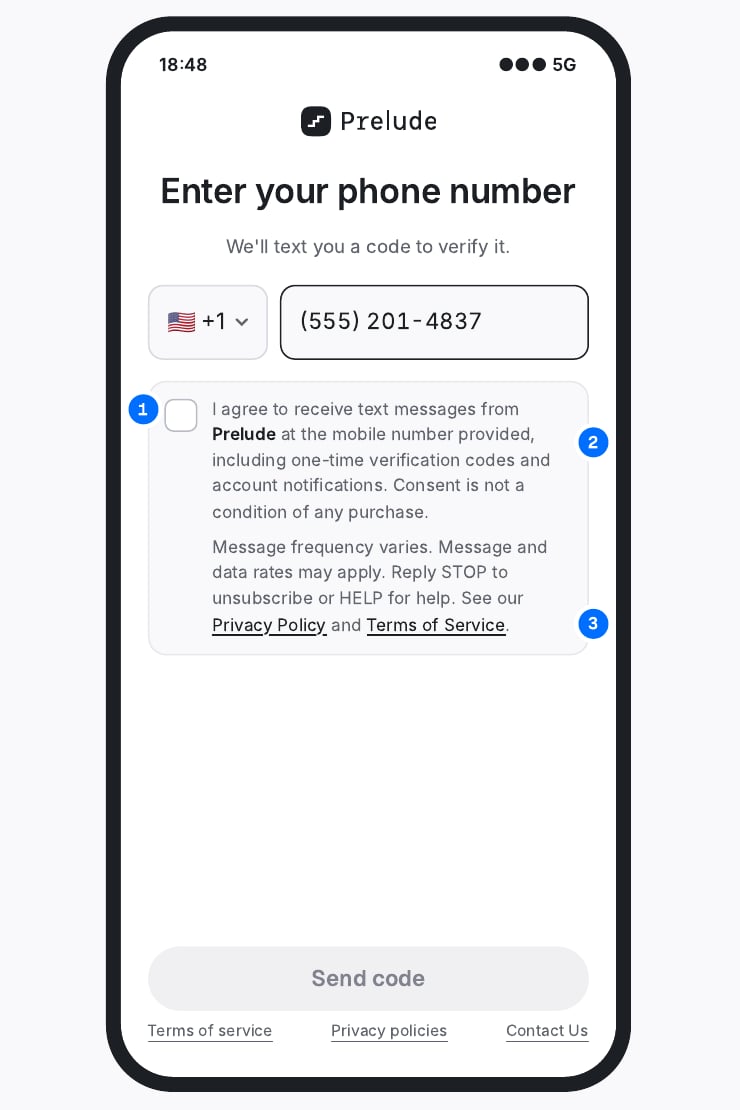
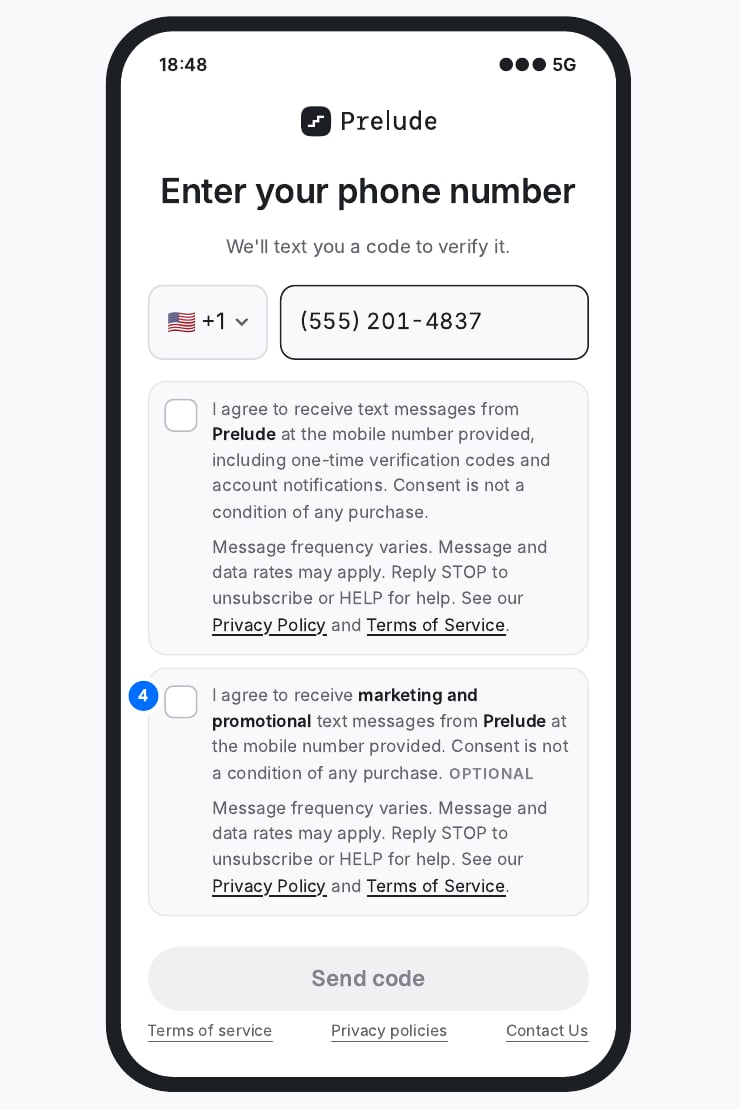
This page shows two example opt-in screens, what carriers check, and text you can copy.
## Choose your opt-in screen
 ## What carriers check on the screen
Each point must be visible in the screenshot you submit with the registration.
The user taps it themselves, on the same screen where they enter their phone number, before the code is sent. It is never pre-checked.
Brand name, what messages they will receive, and that consent is not a condition of purchase.
The Privacy Policy and Terms of Service are linked directly in the consent text.
If you send both transactional and marketing messages, use two checkboxes. Marketing stays optional.
## Consent text
Replace the brand name and message types with your own.
```text Transactional checkbox theme={null}
I agree to receive text messages from [Brand Name] at the mobile number provided, including [one-time verification codes / account notifications / order updates]. Consent is not a condition of any purchase.
Message frequency varies. Message and data rates may apply. Reply STOP to unsubscribe or HELP for help. See our Privacy Policy and Terms of Service.
```
```text Marketing checkbox theme={null}
I agree to receive marketing and promotional text messages from [Brand Name] at the mobile number provided. Consent is not a condition of any purchase.
Message frequency varies. Message and data rates may apply. Reply STOP to unsubscribe or HELP for help. See our Privacy Policy and Terms of Service.
```
## Privacy Policy
Add an SMS/Text Messaging section to the Privacy Policy that the opt-in links to.
```text SMS/Text Messaging theme={null}
If you provide your mobile phone number and opt in to receive text messages from [Brand Name], we will use it only to send you the messages you requested, such as [one-time verification codes / account notifications / order updates].
No mobile information will be shared with third parties or affiliates for marketing or promotional purposes.
Information sharing with subcontractors in support services, such as customer service or message delivery providers, is permitted. All other categories exclude text messaging originator opt-in data and consent; this information will not be shared with any third parties.
You can opt out at any time by replying STOP. For help, reply HELP or contact us at [support email] or [phone].
```
Carriers look for this sentence most: "No mobile information will be shared with third parties or affiliates for marketing or promotional purposes." Carriers reject policies that say data "may be shared with partners" without an exception for SMS data.
## SMS Terms and Conditions
Publish these terms on a page linked from the opt-in as your Terms of Service.
```text [Brand Name] SMS Terms and Conditions theme={null}
1. Program description: By opting in, you agree to receive [one-time passcodes for account login and verification / account and order notifications] from [Brand Name] at the mobile number you provided.
2. Message frequency: Message frequency varies based on your account activity. [For OTP: You will receive a message each time you request a verification code.]
3. Costs: Message and data rates may apply. Contact your wireless provider for details about your plan.
4. Opt out: You can cancel at any time by texting STOP to [number/short code]. You will receive one confirmation message, and no further messages will be sent unless you opt in again.
5. Help: For assistance, text HELP to [number/short code] or contact [support email] / [phone].
6. Carrier liability: Carriers are not liable for delayed or undelivered messages.
7. Eligibility: You must be the account holder or have the account holder's permission to enroll the mobile number.
8. Privacy: See our Privacy Policy at [URL] for how we handle your information.
```
## Next step
When the opt-in screen, Privacy Policy, and Terms are live, send a screenshot of the full screen and the two links to our [support team](mailto:support@prelude.so). We review them before we submit your registration to the carrier, so the registration is not sent back.
This documentation is built and hosted on [Mintlify](https://mintlify.com), a developer documentation platform.
## What carriers check on the screen
Each point must be visible in the screenshot you submit with the registration.
The user taps it themselves, on the same screen where they enter their phone number, before the code is sent. It is never pre-checked.
Brand name, what messages they will receive, and that consent is not a condition of purchase.
The Privacy Policy and Terms of Service are linked directly in the consent text.
If you send both transactional and marketing messages, use two checkboxes. Marketing stays optional.
## Consent text
Replace the brand name and message types with your own.
```text Transactional checkbox theme={null}
I agree to receive text messages from [Brand Name] at the mobile number provided, including [one-time verification codes / account notifications / order updates]. Consent is not a condition of any purchase.
Message frequency varies. Message and data rates may apply. Reply STOP to unsubscribe or HELP for help. See our Privacy Policy and Terms of Service.
```
```text Marketing checkbox theme={null}
I agree to receive marketing and promotional text messages from [Brand Name] at the mobile number provided. Consent is not a condition of any purchase.
Message frequency varies. Message and data rates may apply. Reply STOP to unsubscribe or HELP for help. See our Privacy Policy and Terms of Service.
```
## Privacy Policy
Add an SMS/Text Messaging section to the Privacy Policy that the opt-in links to.
```text SMS/Text Messaging theme={null}
If you provide your mobile phone number and opt in to receive text messages from [Brand Name], we will use it only to send you the messages you requested, such as [one-time verification codes / account notifications / order updates].
No mobile information will be shared with third parties or affiliates for marketing or promotional purposes.
Information sharing with subcontractors in support services, such as customer service or message delivery providers, is permitted. All other categories exclude text messaging originator opt-in data and consent; this information will not be shared with any third parties.
You can opt out at any time by replying STOP. For help, reply HELP or contact us at [support email] or [phone].
```
Carriers look for this sentence most: "No mobile information will be shared with third parties or affiliates for marketing or promotional purposes." Carriers reject policies that say data "may be shared with partners" without an exception for SMS data.
## SMS Terms and Conditions
Publish these terms on a page linked from the opt-in as your Terms of Service.
```text [Brand Name] SMS Terms and Conditions theme={null}
1. Program description: By opting in, you agree to receive [one-time passcodes for account login and verification / account and order notifications] from [Brand Name] at the mobile number you provided.
2. Message frequency: Message frequency varies based on your account activity. [For OTP: You will receive a message each time you request a verification code.]
3. Costs: Message and data rates may apply. Contact your wireless provider for details about your plan.
4. Opt out: You can cancel at any time by texting STOP to [number/short code]. You will receive one confirmation message, and no further messages will be sent unless you opt in again.
5. Help: For assistance, text HELP to [number/short code] or contact [support email] / [phone].
6. Carrier liability: Carriers are not liable for delayed or undelivered messages.
7. Eligibility: You must be the account holder or have the account holder's permission to enroll the mobile number.
8. Privacy: See our Privacy Policy at [URL] for how we handle your information.
```
## Next step
When the opt-in screen, Privacy Policy, and Terms are live, send a screenshot of the full screen and the two links to our [support team](mailto:support@prelude.so). We review them before we submit your registration to the carrier, so the registration is not sent back.
This documentation is built and hosted on [Mintlify](https://mintlify.com), a developer documentation platform.